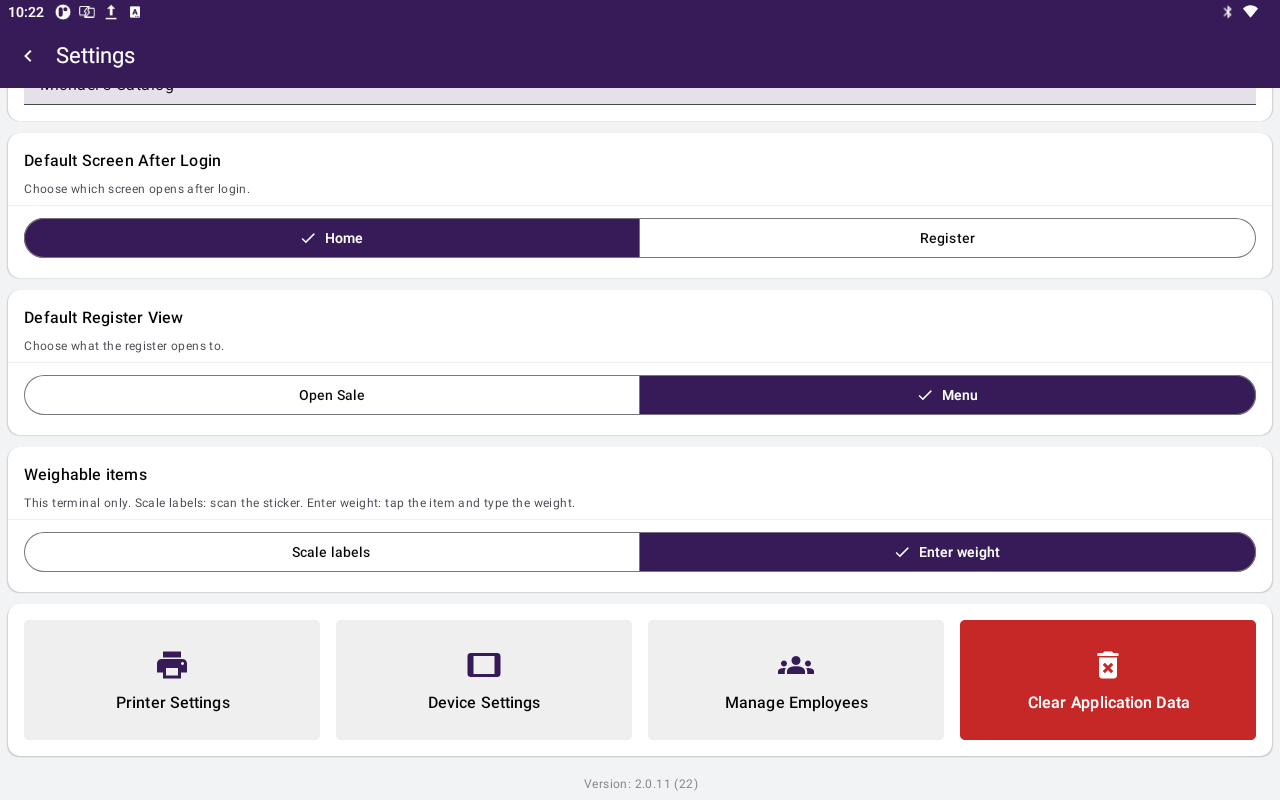
General settings with Weighable items set to Enter weight.
How to get here
Home → Settings → General.Receipt and kitchen toggles
Tip configuration itself lives in Taliup HQ — see Tips.
After payment, staff or the customer choose No Receipt, Paper, or Email. See Customer receipt.
Assigned catalog / menu
Under Assigned Catalog, choose which catalog/menu this terminal uses (Catalog dropdown). If none are available, you’ll see No catalogs available. Use Retry if loading fails.Default Register view
When catalog selling is available, Default Register View lets you choose:- Open Sale
- Catalog or Menu (restaurant label)
Default screen after login
Default Screen After Login chooses Home or Register after a passcode. New terminals open Home. Open Sale–only merchants always land in Register and do not see this setting. This is different from Default Register View, which only applies after Register is already open.Weighable items
When this terminal has a catalog, Weighable items chooses how cashiers add items sold by weight:- Enter weight (default) — tap the item, type the weight, and Register computes catalog
$/unit × weight. - Scale labels — scan the printed sticker. Tapping the item does not add quantity 1.