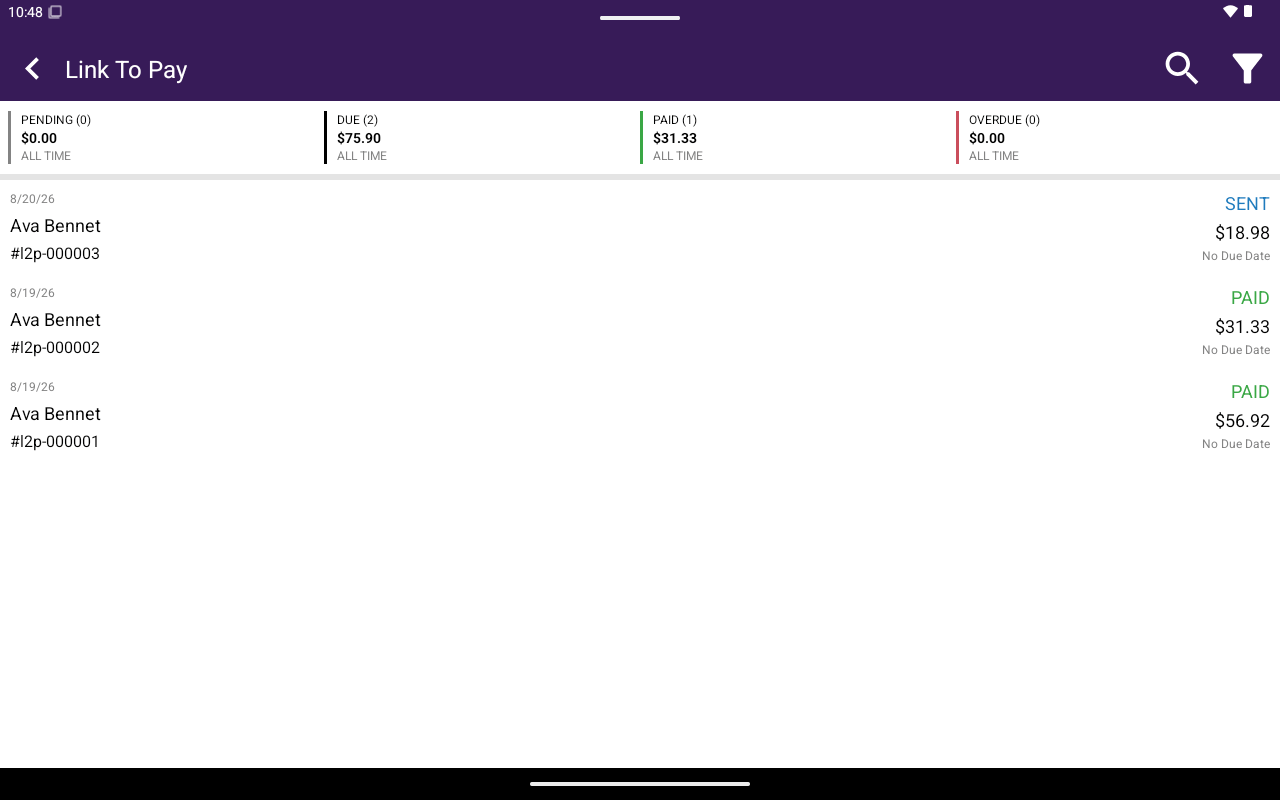
Link To Pay lets you review payment links/invoices, resend them, record offline payments, refund, and delete. Requires the Link to Pay feature and L2P enabled on the merchant’s payment types. If disabled, Taliup POS shows: To enable Link To Pay, please contact your Customer Support for details.
Link To Pay list with PENDING / DUE / PAID / OVERDUE summary cards

Link To Pay list with PENDING / DUE / PAID / OVERDUE summary cards.

How to get here

From Home, tap Link To Pay.

Summary cards

At the top of the list:

List rows

Each row shows created date, client name, #invoiceNumber, status, amount, and Due on … or No Due Date. Statuses include DRAFT, PENDING, SENT, PAID, OVERDUE, REFUNDED. Tap a row to expand actions. See Manage Link To Pay.

Create

You can send a Link To Pay during Register payment when L2P is available. See Create and send. Invoices can also be created from Taliup HQ — see Invoicing.