> ## Documentation Index
> Fetch the complete documentation index at: https://docs.taliuphq.com/llms.txt
> Use this file to discover all available pages before exploring further.
# Transaction details
> View payment details and available actions such as Void, Return, Post Auth, Adjust Tip, and reprint.
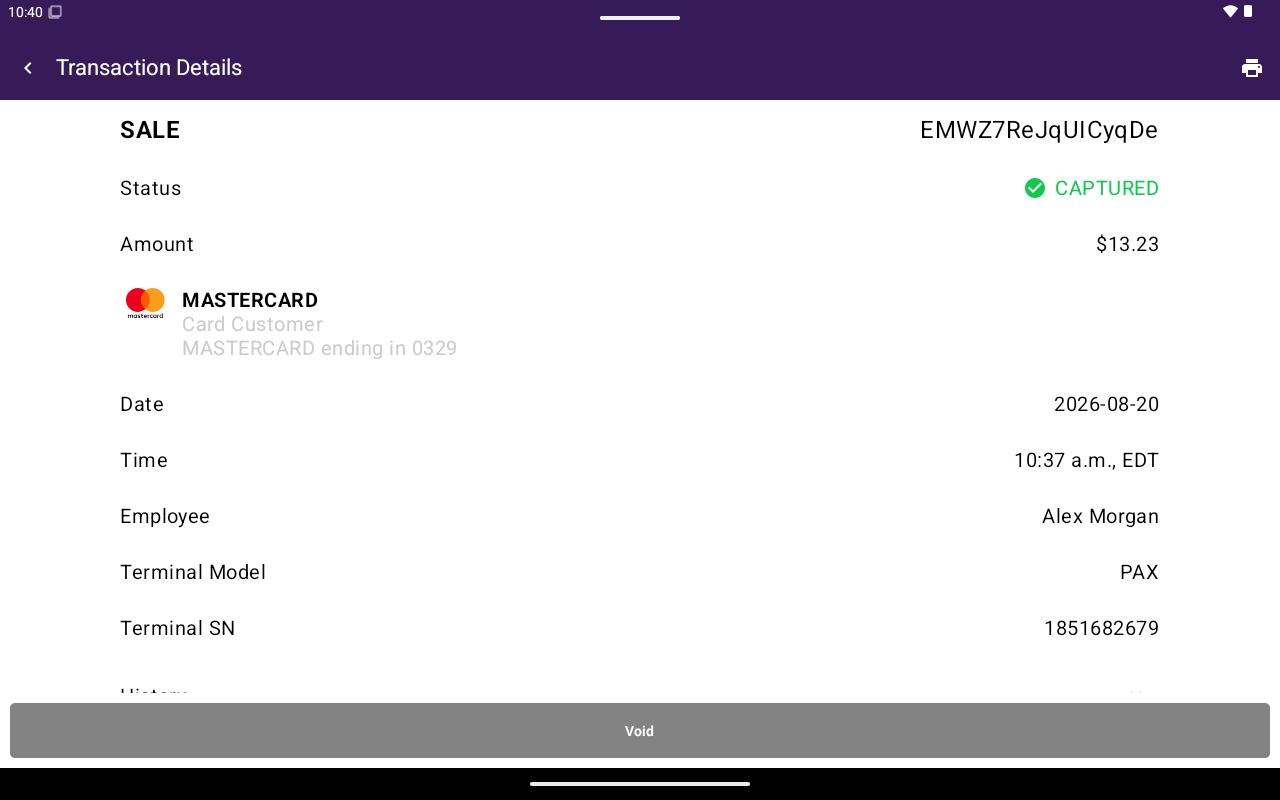
Open any row on the Transactions list to see **Transaction Details**.
 ## What you see
| Field | Description |
| ------------------------------------ | ---------------------------------------- |
| Transaction type / reference | Type label with the payment reference |
| **Status** | Current status (color-coded) |
| **Amount** | Payment amount |
| **Payment Method** | Cash, or card brand / holder / last four |
| **Date** / **Time** | When it was taken |
| **Employee** | Staff member, or N/A |
| **Terminal Model** / **Terminal SN** | Device info when available |
| **History** | Expandable status/amount history |
| **Batch #** / **Trans. #** | Processor references when available |
| **Settlement** | **Settled** or **Not Settled** |
## Actions
Actions appear at the bottom of the screen only when the payment is eligible. Staff without manage-transactions permission do not see **Void**, **Void Auth**, or **Return**.
| Button | Typical use |
| --------------- | --------------------------------------------------------------------------- |
| **Void** | Cancel an unsettled captured payment |
| **Void Auth** | Cancel an unsettled authorization that was not captured |
| **Delete Auth** | Remove a pre-authorization on some card-reader setups |
| **Return** | Start a refund / return flow |
| **Post Auth** | Capture an unsettled authorization (permission required) |
| **Adjust Tip** | Change tip on an eligible unsettled card payment when tip adjust is enabled |
See [Void](/taliup-pos/transactions/void) and [Refund](/taliup-pos/transactions/refund) for step-by-step flows.
### Reprint from details
Tap the print icon in the app bar, then choose **Print Merchant Copy** or **Print Customer Copy** (payouts may show **Print Receipt** only). See [Reprint](/taliup-pos/transactions/reprint).
## Related
* [Search and filters](/taliup-pos/transactions/search-and-filters)
## What you see
| Field | Description |
| ------------------------------------ | ---------------------------------------- |
| Transaction type / reference | Type label with the payment reference |
| **Status** | Current status (color-coded) |
| **Amount** | Payment amount |
| **Payment Method** | Cash, or card brand / holder / last four |
| **Date** / **Time** | When it was taken |
| **Employee** | Staff member, or N/A |
| **Terminal Model** / **Terminal SN** | Device info when available |
| **History** | Expandable status/amount history |
| **Batch #** / **Trans. #** | Processor references when available |
| **Settlement** | **Settled** or **Not Settled** |
## Actions
Actions appear at the bottom of the screen only when the payment is eligible. Staff without manage-transactions permission do not see **Void**, **Void Auth**, or **Return**.
| Button | Typical use |
| --------------- | --------------------------------------------------------------------------- |
| **Void** | Cancel an unsettled captured payment |
| **Void Auth** | Cancel an unsettled authorization that was not captured |
| **Delete Auth** | Remove a pre-authorization on some card-reader setups |
| **Return** | Start a refund / return flow |
| **Post Auth** | Capture an unsettled authorization (permission required) |
| **Adjust Tip** | Change tip on an eligible unsettled card payment when tip adjust is enabled |
See [Void](/taliup-pos/transactions/void) and [Refund](/taliup-pos/transactions/refund) for step-by-step flows.
### Reprint from details
Tap the print icon in the app bar, then choose **Print Merchant Copy** or **Print Customer Copy** (payouts may show **Print Receipt** only). See [Reprint](/taliup-pos/transactions/reprint).
## Related
* [Search and filters](/taliup-pos/transactions/search-and-filters)