> ## Documentation Index
> Fetch the complete documentation index at: https://docs.taliuphq.com/llms.txt
> Use this file to discover all available pages before exploring further.
# General settings
> Tips indicator, receipt behavior, default Register view, assigned catalog, printers, and clear application data.
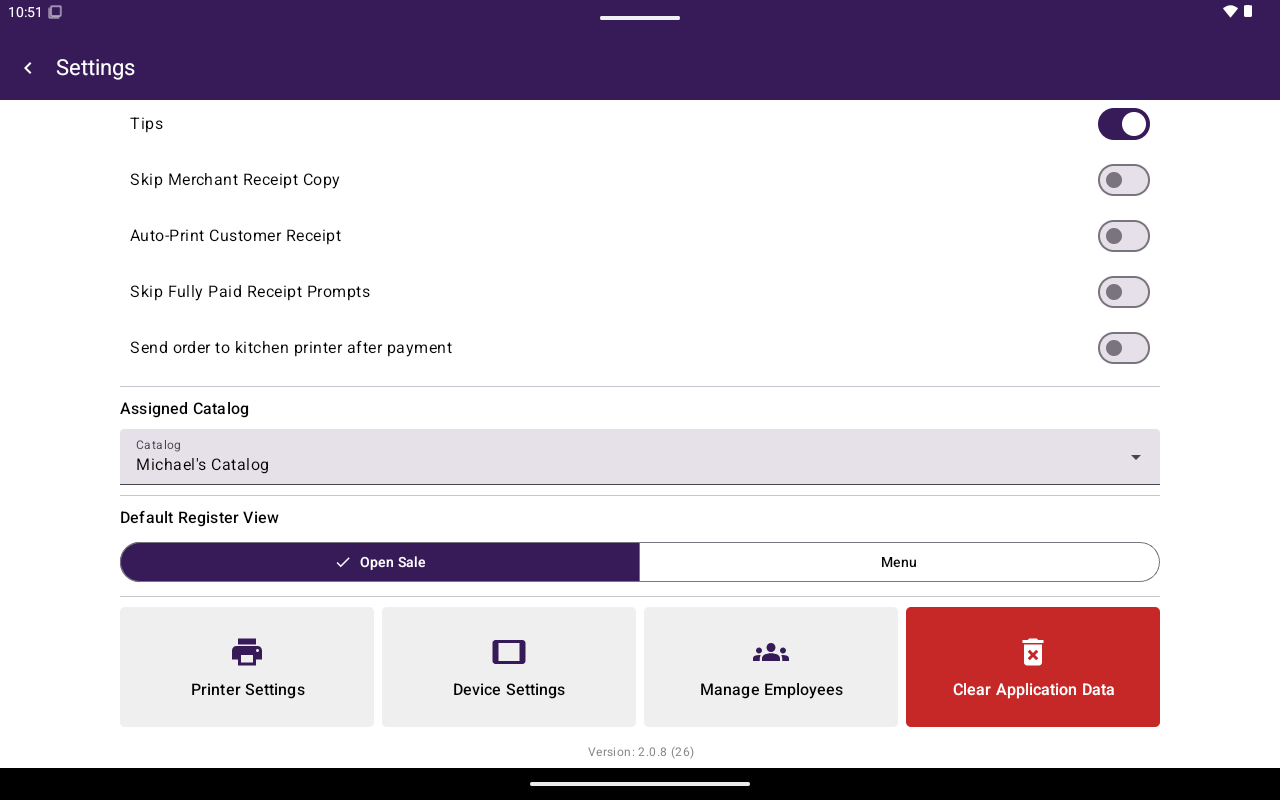
**General** controls day-to-day terminal behavior for receipts, Register defaults, and linked hardware settings.
 ## How to get here
Home → **Settings** → **General**.
## Receipt and kitchen toggles
| Control | What it does |
| ----------------------------------------------- | --------------------------------------------------------------------------------------- |
| **Tips** | Shows whether tips are enabled for the merchant (display only — configure in Taliup HQ) |
| **Skip Merchant Receipt Copy** | Skips printing the merchant copy |
| **Auto-Print Customer Receipt** | Prints the customer copy automatically after payment |
| **Skip Fully Paid Receipt Prompts** | Skips “order fully paid” print prompts |
| **Send order to kitchen printer after payment** | Offers/sends kitchen tickets after payment when kitchen printing is available |
Tip configuration itself lives in Taliup HQ — see [Tips](/taliup-hq/onboarding/tips).
## Assigned catalog / menu
Under **Assigned Catalog**, choose which catalog/menu this terminal uses (**Catalog** dropdown). If none are available, you’ll see **No catalogs available.** Use **Retry** if loading fails.
## Default Register view
When catalog selling is available, **Default Register View** lets you choose:
* **Open Sale**
* **Catalog** or **Menu** (restaurant label)
This controls which view Register opens first. See [Open a sale](/taliup-pos/register/open-sale).
## Printer and device shortcuts
| Button | Opens |
| -------------------- | --------------------------------------------------------------------------------------------- |
| **Printer Settings** | [Printers](/taliup-pos/settings/printers) |
| **Device Settings** | [Device](/taliup-pos/settings/device) — only when this payment setup supports device settings |
## Clear application data
**Clear Application Data** wipes local app data on this terminal after you confirm. Use only when directed by support — you will need to sign in again.
## Exit demo mode
If the terminal is in a demo session, **Exit Demo Mode** appears so you can leave demo.
## How to get here
Home → **Settings** → **General**.
## Receipt and kitchen toggles
| Control | What it does |
| ----------------------------------------------- | --------------------------------------------------------------------------------------- |
| **Tips** | Shows whether tips are enabled for the merchant (display only — configure in Taliup HQ) |
| **Skip Merchant Receipt Copy** | Skips printing the merchant copy |
| **Auto-Print Customer Receipt** | Prints the customer copy automatically after payment |
| **Skip Fully Paid Receipt Prompts** | Skips “order fully paid” print prompts |
| **Send order to kitchen printer after payment** | Offers/sends kitchen tickets after payment when kitchen printing is available |
Tip configuration itself lives in Taliup HQ — see [Tips](/taliup-hq/onboarding/tips).
## Assigned catalog / menu
Under **Assigned Catalog**, choose which catalog/menu this terminal uses (**Catalog** dropdown). If none are available, you’ll see **No catalogs available.** Use **Retry** if loading fails.
## Default Register view
When catalog selling is available, **Default Register View** lets you choose:
* **Open Sale**
* **Catalog** or **Menu** (restaurant label)
This controls which view Register opens first. See [Open a sale](/taliup-pos/register/open-sale).
## Printer and device shortcuts
| Button | Opens |
| -------------------- | --------------------------------------------------------------------------------------------- |
| **Printer Settings** | [Printers](/taliup-pos/settings/printers) |
| **Device Settings** | [Device](/taliup-pos/settings/device) — only when this payment setup supports device settings |
## Clear application data
**Clear Application Data** wipes local app data on this terminal after you confirm. Use only when directed by support — you will need to sign in again.
## Exit demo mode
If the terminal is in a demo session, **Exit Demo Mode** appears so you can leave demo.