> ## Documentation Index
> Fetch the complete documentation index at: https://docs.taliuphq.com/llms.txt
> Use this file to discover all available pages before exploring further.
# Settings
> Configure general, printer, and device settings on Taliup POS.
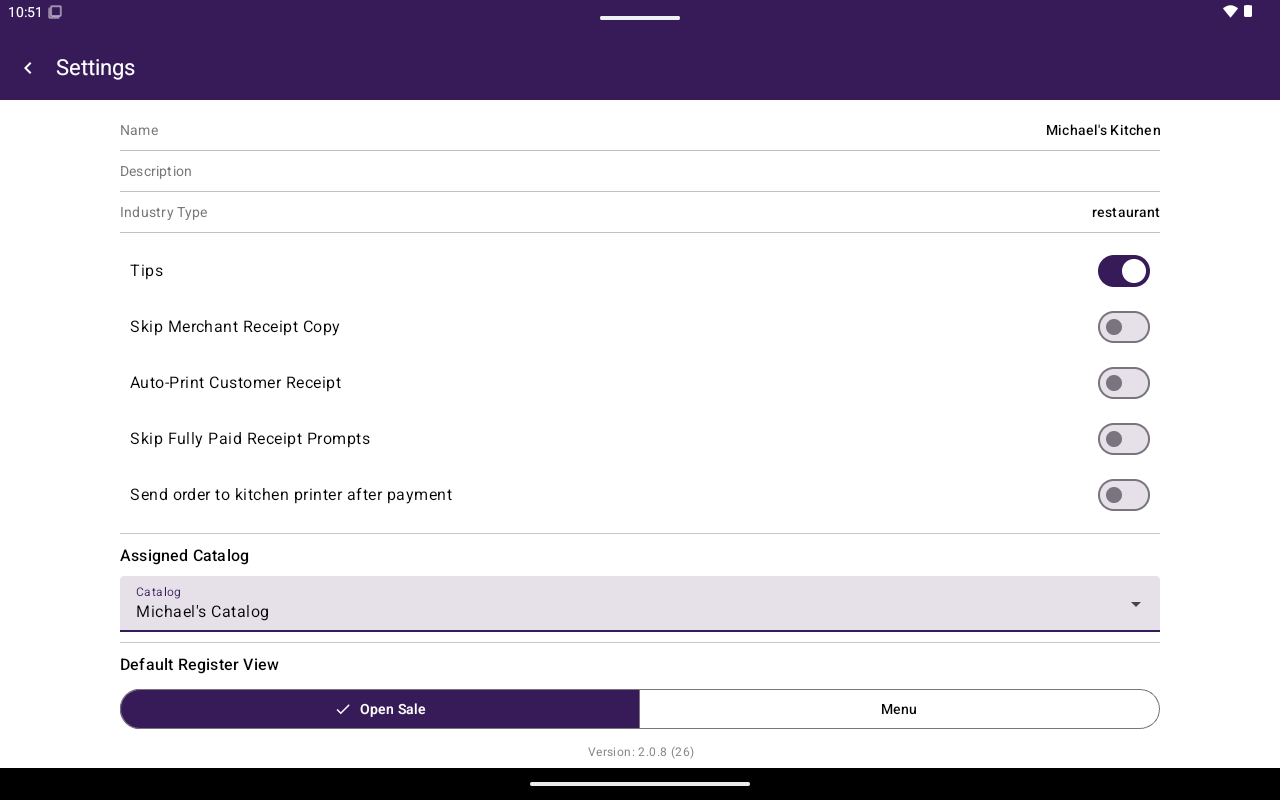
Open **Settings** from Home to configure how this terminal behaves. Use **General** for day-to-day options, plus printer and device screens.
 ## In this section
| Page | What it covers |
| ----------------------------------------- | -------------------------------------------------------------------------------------- |
| [General](/taliup-pos/settings/general) | Receipts, kitchen print, default Register view, assigned catalog, clear data |
| [Printers](/taliup-pos/settings/printers) | Add Bluetooth printers, set the receipt printer, connect a kitchen or external printer |
| [Device](/taliup-pos/settings/device) | Card reader connection options |
The Settings footer shows the installed app version.
## In this section
| Page | What it covers |
| ----------------------------------------- | -------------------------------------------------------------------------------------- |
| [General](/taliup-pos/settings/general) | Receipts, kitchen print, default Register view, assigned catalog, clear data |
| [Printers](/taliup-pos/settings/printers) | Add Bluetooth printers, set the receipt printer, connect a kitchen or external printer |
| [Device](/taliup-pos/settings/device) | Card reader connection options |
The Settings footer shows the installed app version.