> ## Documentation Index
> Fetch the complete documentation index at: https://docs.taliuphq.com/llms.txt
> Use this file to discover all available pages before exploring further.
# Options side menu
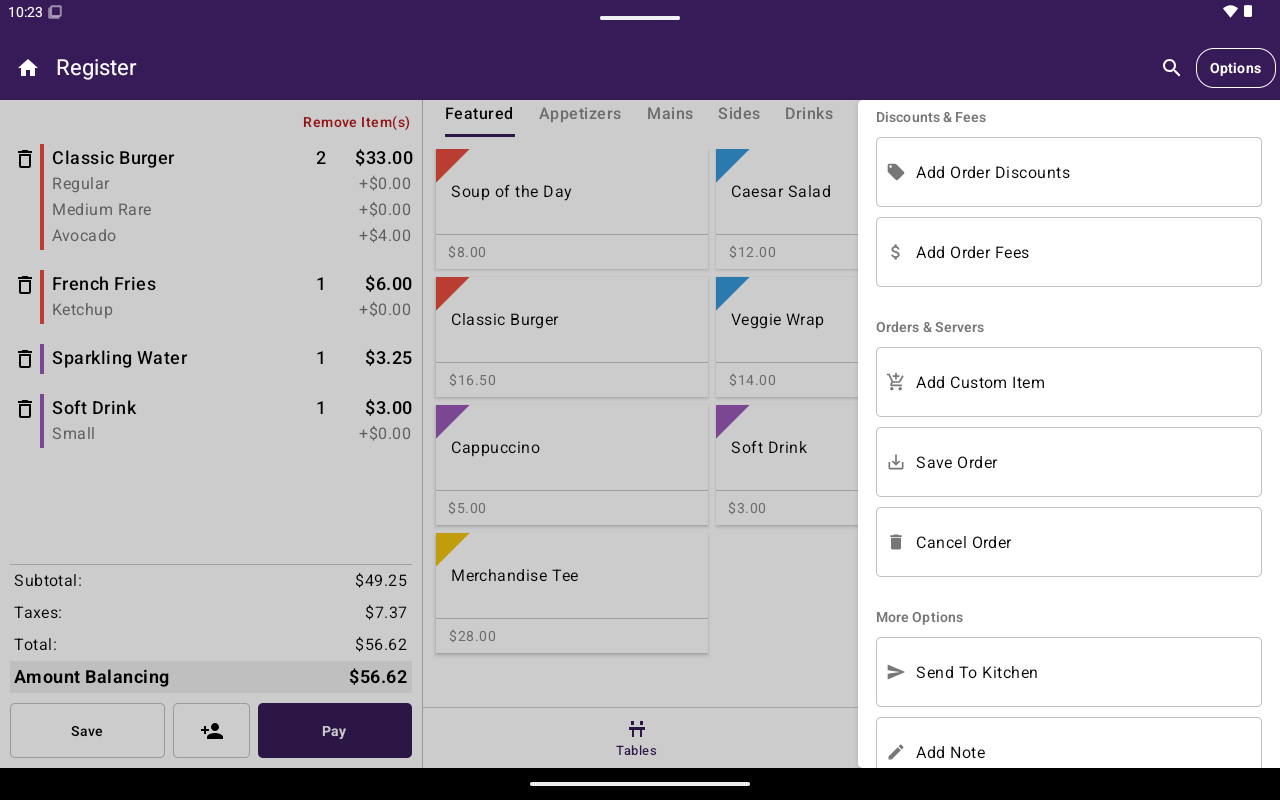
> Register Options menu for bills and payments, discounts and fees, order actions, kitchen, notes, cash drawer, and scanner.
Tap **Options** in the Register app bar to open the side menu. Empty sections are hidden. What you see depends on Open Sale vs Menu/Catalog, table vs non-table orders, role permissions, and plan features.
 ## Bills and payments
| Option | What it does | When it appears |
| -------------------------- | ---------------------------------------------------- | ----------------------------------------------------------------------- |
| **Print Entire Bill** | Prints the full order bill | Not on the Open Sale tab |
| **Print Individual Bills** | Opens per-guest bill printing | Table orders |
| **Create Auth** | Switches Register into authorization (pre-auth) mode | Non-table orders; needs pre-auth permission |
| **Create Refund** | Switches Register into refund mode | Non-table orders; needs refund permission |
| **Create Cash Payout** | Starts a cash payout | When the payout feature is available (or shows an upgrade/denied state) |
While Register is in **Auth** or **Refund** mode, the side menu shows **Cancel Auth** or **Cancel Refund** so you can return to normal payment mode. The app bar title changes to **Auth** or **Refund**.
## Discounts and fees
Shown for non-table orders when you are not on the Open Sale tab.
| Option | What it does | Notes |
| ----------------------- | --------------------------- | ----------------------- |
| **Add Order Discounts** | Apply order-level discounts | Needs discounts feature |
| **Add Order Fees** | Apply order-level fees | Needs fees feature |
If the feature is not entitled, Taliup POS explains that access is blocked instead of applying the discount or fee.
## Orders and servers
| Option | What it does | When it appears |
| ------------------- | ------------------------------------------------- | ---------------- |
| **Add Custom Item** | Adds a custom-priced line item | Not on Open Sale |
| **Save Order** | Saves the current open order | Not on Open Sale |
| **Complete Order** | Completes a table order (confirmation required) | Table orders |
| **Cancel Order** | Cancels the current order (confirmation required) | Not on Open Sale |
| **Move Order** | Moves the order to another table | Table orders |
## More options
| Option | What it does | When it appears |
| ------------------------- | ----------------------------------- | ----------------------------- |
| **Send To Kitchen** | Opens kitchen print for the order | Restaurants; not on Open Sale |
| **Combine Items** | Combines table orders | Table orders |
| **Increase Party Size** | Increases guests on the table order | Table orders |
| **Add Note** | Adds an order note | Always |
| **Add Custom Order Name** | Names the order | Restaurants; not on Open Sale |
| **Open Cash Drawer** | Opens the cash drawer | Always |
| **Open Scanner** | Opens the barcode scanner | Not on Open Sale |
## Permission tips for support
* **Create Auth** / **Create Refund** appear but may be disabled without the right role permission — staff see a permission message when they tap them.
* Discounts, fees, clients, and payouts can be plan-gated even when the menu entry is visible or attempted.
* Many Options entries disappear on **Open Sale**; switch to Menu/Catalog or open a saved/table order if a tool is missing.
## Related
* [Cart](/taliup-pos/register/cart)
* [Take payment](/taliup-pos/register/take-payment)
* [Tables](/taliup-pos/tables)
## Bills and payments
| Option | What it does | When it appears |
| -------------------------- | ---------------------------------------------------- | ----------------------------------------------------------------------- |
| **Print Entire Bill** | Prints the full order bill | Not on the Open Sale tab |
| **Print Individual Bills** | Opens per-guest bill printing | Table orders |
| **Create Auth** | Switches Register into authorization (pre-auth) mode | Non-table orders; needs pre-auth permission |
| **Create Refund** | Switches Register into refund mode | Non-table orders; needs refund permission |
| **Create Cash Payout** | Starts a cash payout | When the payout feature is available (or shows an upgrade/denied state) |
While Register is in **Auth** or **Refund** mode, the side menu shows **Cancel Auth** or **Cancel Refund** so you can return to normal payment mode. The app bar title changes to **Auth** or **Refund**.
## Discounts and fees
Shown for non-table orders when you are not on the Open Sale tab.
| Option | What it does | Notes |
| ----------------------- | --------------------------- | ----------------------- |
| **Add Order Discounts** | Apply order-level discounts | Needs discounts feature |
| **Add Order Fees** | Apply order-level fees | Needs fees feature |
If the feature is not entitled, Taliup POS explains that access is blocked instead of applying the discount or fee.
## Orders and servers
| Option | What it does | When it appears |
| ------------------- | ------------------------------------------------- | ---------------- |
| **Add Custom Item** | Adds a custom-priced line item | Not on Open Sale |
| **Save Order** | Saves the current open order | Not on Open Sale |
| **Complete Order** | Completes a table order (confirmation required) | Table orders |
| **Cancel Order** | Cancels the current order (confirmation required) | Not on Open Sale |
| **Move Order** | Moves the order to another table | Table orders |
## More options
| Option | What it does | When it appears |
| ------------------------- | ----------------------------------- | ----------------------------- |
| **Send To Kitchen** | Opens kitchen print for the order | Restaurants; not on Open Sale |
| **Combine Items** | Combines table orders | Table orders |
| **Increase Party Size** | Increases guests on the table order | Table orders |
| **Add Note** | Adds an order note | Always |
| **Add Custom Order Name** | Names the order | Restaurants; not on Open Sale |
| **Open Cash Drawer** | Opens the cash drawer | Always |
| **Open Scanner** | Opens the barcode scanner | Not on Open Sale |
## Permission tips for support
* **Create Auth** / **Create Refund** appear but may be disabled without the right role permission — staff see a permission message when they tap them.
* Discounts, fees, clients, and payouts can be plan-gated even when the menu entry is visible or attempted.
* Many Options entries disappear on **Open Sale**; switch to Menu/Catalog or open a saved/table order if a tool is missing.
## Related
* [Cart](/taliup-pos/register/cart)
* [Take payment](/taliup-pos/register/take-payment)
* [Tables](/taliup-pos/tables)