> ## Documentation Index
> Fetch the complete documentation index at: https://docs.taliuphq.com/llms.txt
> Use this file to discover all available pages before exploring further.
# Past order actions
> Print receipts, send to kitchen, and review order totals from Order Details.
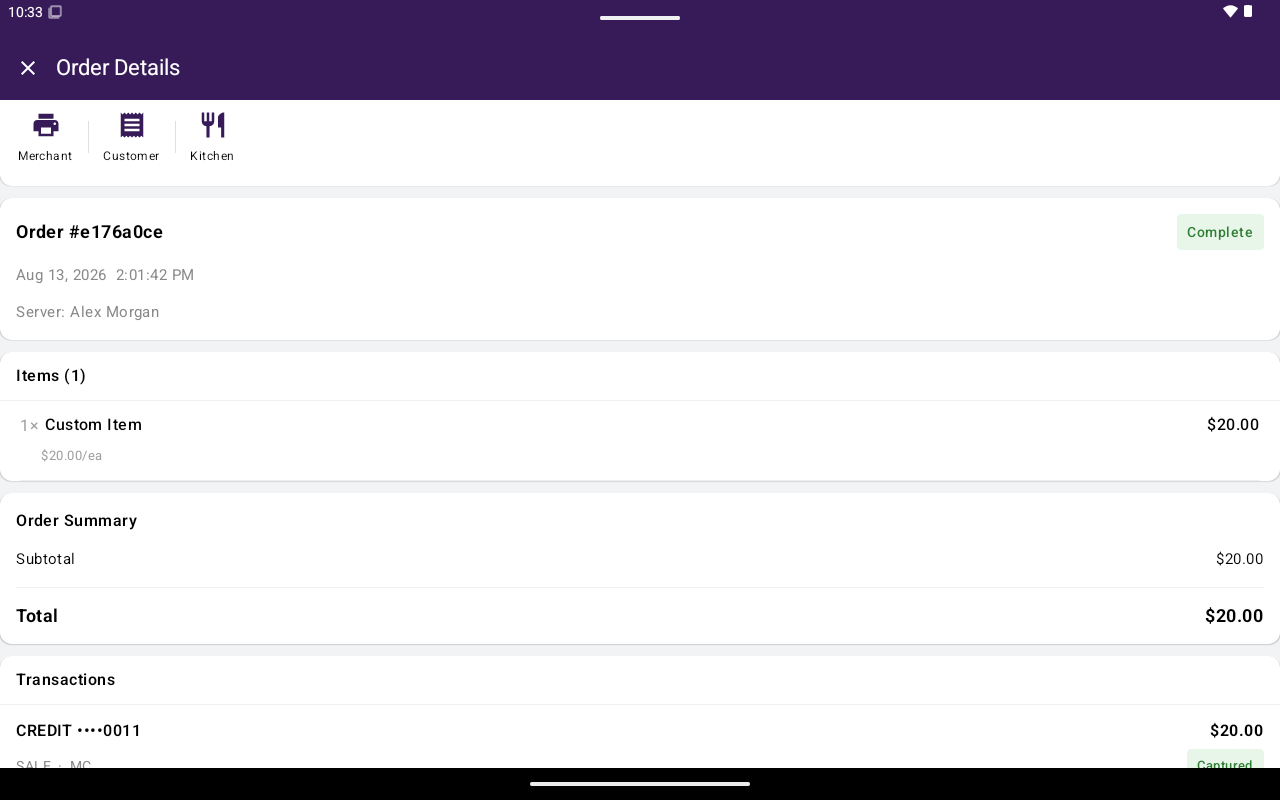
Open any order to review totals and use print actions. Bottom actions like **Open In Register** apply only to open orders — see [Find and reopen](/taliup-pos/orders/find-and-reopen).
 ## Review totals
Order Details can show:
* **Subtotal:**
* Tax, discount, and fee totals
* **Card price adjustment:** (when dual pricing applies)
* **Tip:**
* **Total:**
* Refund / net amounts when applicable
* **Note**
## Print and kitchen
Tap the print control in the header to open receipt options:
| Option | Notes |
| --------------------------- | ---------------- |
| **Print Merchant Receipt** | Merchant copy |
| **Print Customer Receipt** | Customer copy |
| **Send To Kitchen Printer** | Restaurants only |
Printer setup is under [Settings → Printers](/taliup-pos/settings/printers).
## Tip adjust
An **Adjust Tip** control exists in the product for some order/payment scenarios, but it is not currently shown on Order Details. Tip changes that are available today are handled from [Transaction details](/taliup-pos/transactions/details) when tip adjust is enabled and the payment is eligible.
## Related
* [Find and reopen](/taliup-pos/orders/find-and-reopen)
* [Transactions → Reprint](/taliup-pos/transactions/reprint)
## Review totals
Order Details can show:
* **Subtotal:**
* Tax, discount, and fee totals
* **Card price adjustment:** (when dual pricing applies)
* **Tip:**
* **Total:**
* Refund / net amounts when applicable
* **Note**
## Print and kitchen
Tap the print control in the header to open receipt options:
| Option | Notes |
| --------------------------- | ---------------- |
| **Print Merchant Receipt** | Merchant copy |
| **Print Customer Receipt** | Customer copy |
| **Send To Kitchen Printer** | Restaurants only |
Printer setup is under [Settings → Printers](/taliup-pos/settings/printers).
## Tip adjust
An **Adjust Tip** control exists in the product for some order/payment scenarios, but it is not currently shown on Order Details. Tip changes that are available today are handled from [Transaction details](/taliup-pos/transactions/details) when tip adjust is enabled and the payment is eligible.
## Related
* [Find and reopen](/taliup-pos/orders/find-and-reopen)
* [Transactions → Reprint](/taliup-pos/transactions/reprint)