> ## Documentation Index
> Fetch the complete documentation index at: https://docs.taliuphq.com/llms.txt
> Use this file to discover all available pages before exploring further.
# Orders
> Find open and past orders, reopen them in Register, cancel, and reprint.
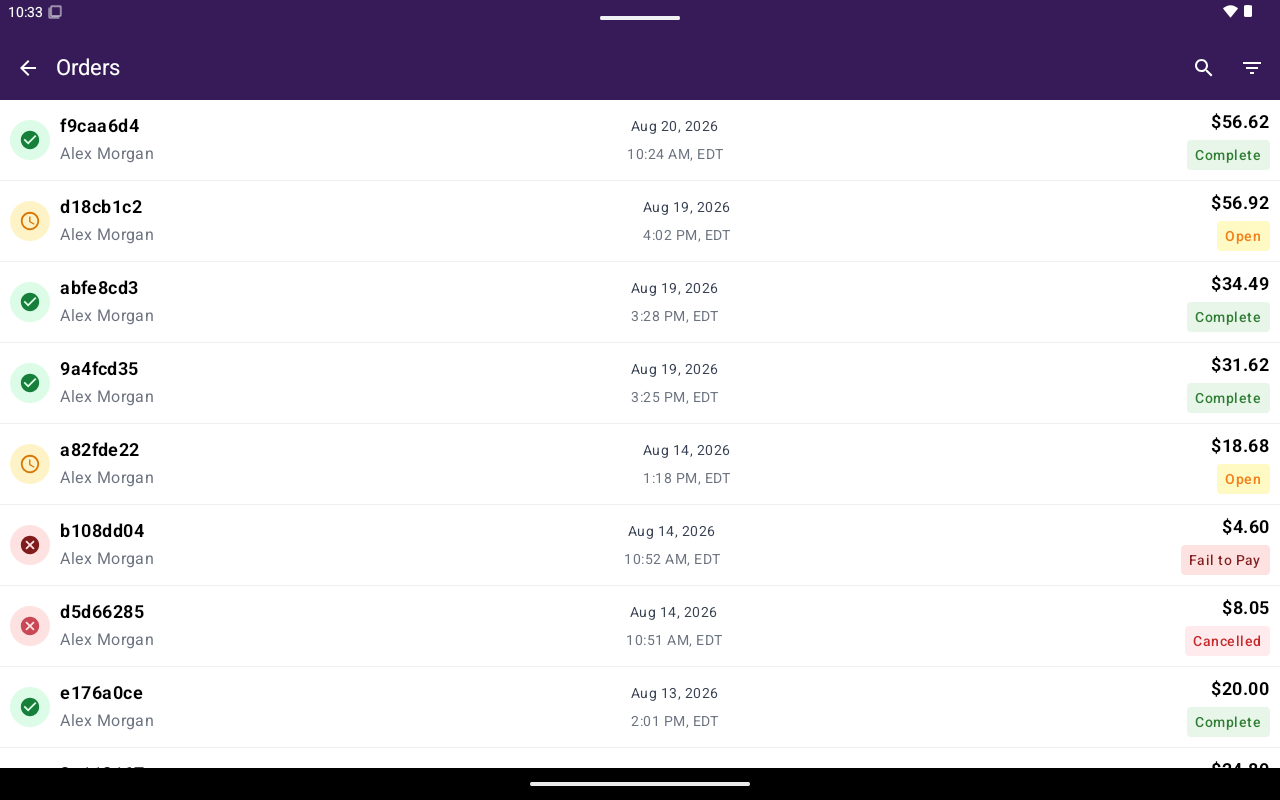
**Orders** lists open and past orders so you can reopen them in Register, cancel open orders, or reprint receipts.
 ## How to get here
From Home, tap **Orders**.
## What’s on the list
| Column | Shows |
| ------------- | ------------------------------------- |
| **Name** | Order name / identifier |
| **Date/Time** | When the order was created or updated |
| **Total** | Order total |
Rows show status chips such as **Open**, **Complete**, or **Cancelled**.
Use search and [filters](/taliup-pos/orders/find-and-reopen) to narrow the list. Pull down to refresh.
If QuickBooks is enabled for the merchant, **Sync Sales** may appear at the bottom of the list.
## Common actions
Search, filter by status, and open an order in Register.
Print receipts, send to kitchen, and review totals.
## Related
* [Register](/taliup-pos/register)
* [Tables](/taliup-pos/tables)
## How to get here
From Home, tap **Orders**.
## What’s on the list
| Column | Shows |
| ------------- | ------------------------------------- |
| **Name** | Order name / identifier |
| **Date/Time** | When the order was created or updated |
| **Total** | Order total |
Rows show status chips such as **Open**, **Complete**, or **Cancelled**.
Use search and [filters](/taliup-pos/orders/find-and-reopen) to narrow the list. Pull down to refresh.
If QuickBooks is enabled for the merchant, **Sync Sales** may appear at the bottom of the list.
## Common actions
Search, filter by status, and open an order in Register.
Print receipts, send to kitchen, and review totals.
## Related
* [Register](/taliup-pos/register)
* [Tables](/taliup-pos/tables)