> ## Documentation Index
> Fetch the complete documentation index at: https://docs.taliuphq.com/llms.txt
> Use this file to discover all available pages before exploring further.
# Calendar
> View the appointment calendar and filter by location in Taliup POS.
Home tile **Calendar** opens the appointment calendar.
Requires the **Calendar** feature. If it is not enabled, Taliup POS shows a feature access message.
 ## How to get here
From Home, tap **Calendar**.
## Views
| View | How it works |
| --------- | ---------------------------------------------------------------------- |
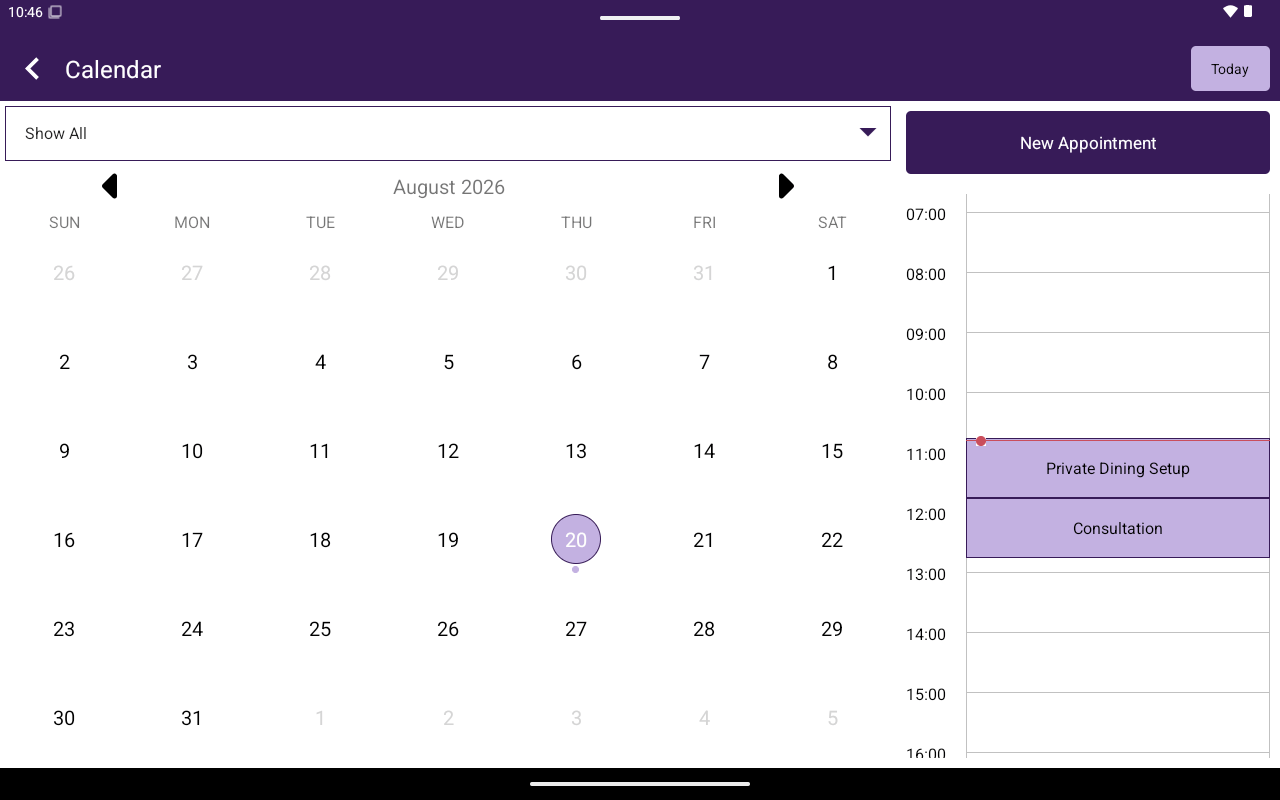
| **Month** | Default grid with week headers **SUN**–**SAT**; swipe to change months |
| **Day** | Tap a day to open the day timeline and week strip; swipe weeks |
Use **Today** in the app bar to jump to the current date. In landscape, month and day can appear side by side.
## Location filter
Use the location spinner. First option: **Show All**, then each location name.
## Appointments on the day view
Appointment chips show the appointment **title**. Tap a chip to open it. Create new ones with **New Appointment** — see [Appointments](/taliup-pos/calendar/appointments).
This calendar is for **appointments**, not employee shift scheduling.
## How to get here
From Home, tap **Calendar**.
## Views
| View | How it works |
| --------- | ---------------------------------------------------------------------- |
| **Month** | Default grid with week headers **SUN**–**SAT**; swipe to change months |
| **Day** | Tap a day to open the day timeline and week strip; swipe weeks |
Use **Today** in the app bar to jump to the current date. In landscape, month and day can appear side by side.
## Location filter
Use the location spinner. First option: **Show All**, then each location name.
## Appointments on the day view
Appointment chips show the appointment **title**. Tap a chip to open it. Create new ones with **New Appointment** — see [Appointments](/taliup-pos/calendar/appointments).
This calendar is for **appointments**, not employee shift scheduling.