> ## Documentation Index
> Fetch the complete documentation index at: https://docs.taliuphq.com/llms.txt
> Use this file to discover all available pages before exploring further.
# Entity Profile
> Reference for the Profile tab on the Manage Entity page — status badges, profile details, Payment Types, Poynt Credentials, Features, Entity Timeline, editing, and cancelling an entity.
The **Profile** tab is the landing view when you open a merchant (Entity) from the Entities list. It gives a full read-only summary of the entity's configuration alongside inline controls for Payment Types and a modal for editing core details.
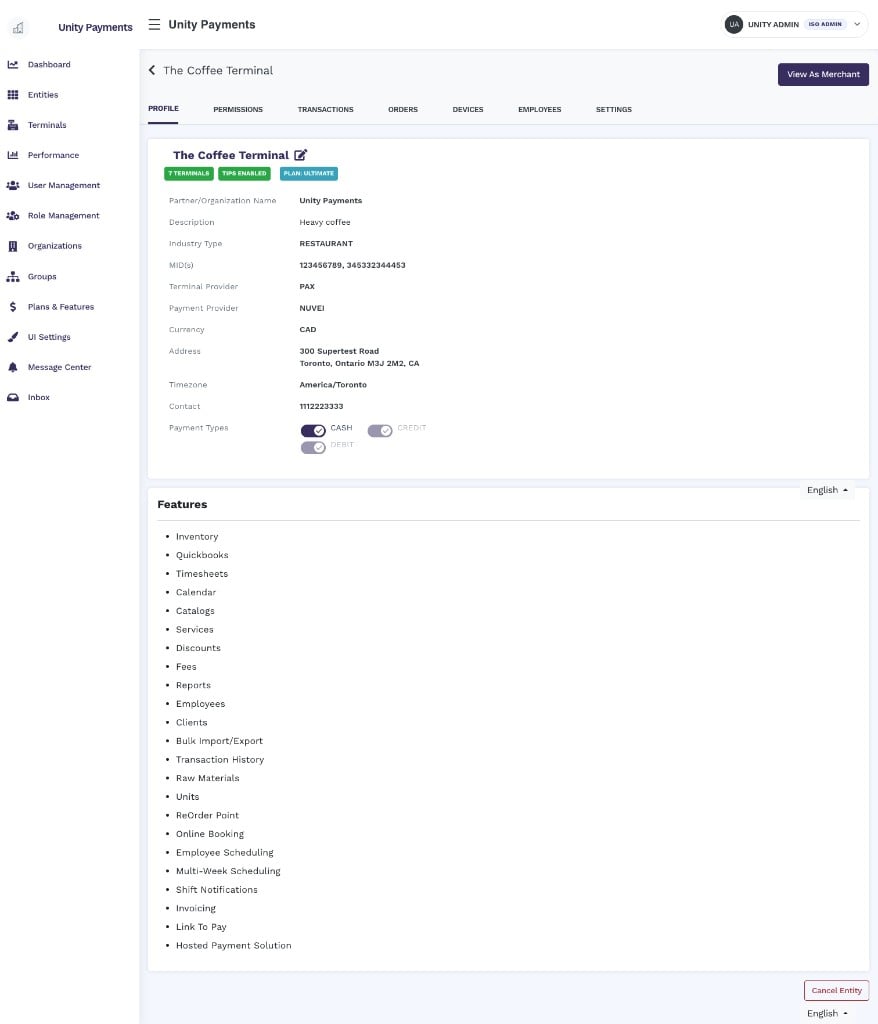 The Manage Entity page has seven tabs: **Profile**, Permissions, Transactions, Orders, Devices, Employees, and Settings. This page documents the Profile tab only.
***
## Page header
At the top of the page, the entity name is displayed as a back-link — clicking it returns to the [Entities list](/taliup-hq/entities). Below the name, a row of status badges summarises the entity at a glance:
| Badge | Condition |
| -------------------------------- | ----------------------------------------------------------------------------- |
| **X Terminals** | Green when the entity has one or more registered terminals; grey when zero. |
| **Tips Enabled / Tips Disabled** | Green when tips are configured; grey when disabled. |
| **Plan: \[name]** | Blue badge showing the current subscription plan name. |
| **No plan assigned** | Grey badge shown when no plan is linked. |
| **QuickBooks Online Connected** | Green badge; only shown when the entity has an active QuickBooks integration. |
The **View As Merchant** button in the top-right corner impersonates the merchant — the same action available from the [Entities list](/taliup-hq/entities). See [View As / Impersonate](/taliup-hq/entities#view-as-impersonate) for details.
***
## Profile details
The main profile card displays a read-only summary of the entity's configuration. Click the **pencil icon** next to the entity name to edit these fields — see [Editing the profile](#editing-the-profile) below.
| Field | Notes |
| ----------------------------- | ----------------------------------------------------------------------------------------------------------------------- |
| **Partner/Organization Name** | The parent ISO that owns this entity. |
| **Created By** | Visible to Super Admins only. Shows the first name, last name, and email of the user who originally created the entity. |
| **Description** | Internal note set during entity creation. Displays `---` when blank. |
| **Industry Type** | Displayed in uppercase — `RESTAURANT`, `RETAIL/WHOLESALE`, or `CHARITY`. |
| **MID(s)** | Comma-separated list of all Merchant IDs across the entity's locations. |
| **Terminal Provider** | Uppercase (e.g., `PAX`, `POYNT`, `EXPRESS`). |
| **Payment Provider** | Uppercase (e.g., `NUVEI`, `TSYS_SIERRA`, `RAPID_CONNECT`). |
| **Currency** | `CAD`, `USD`, or `MXN`. |
| **Address** | Full address including optional unit number, city, region, postal code, and country. |
| **Timezone** | IANA timezone string (e.g., `America/Toronto`). |
| **Contact** | Entity phone number. |
| **Payment Types** | Inline toggle switches — see [Payment Types](#payment-types) below. |
| **Open Sale Mode** | Conditional — see [Open Sale Mode](#open-sale-mode) below. |
***
## Payment Types
The Payment Types row displays inline toggle switches for each payment type the entity supports. **Each toggle saves immediately** — there is no separate submit button.
| Payment Type | When editable |
| ------------ | ---------------------------------------------------------------------------------------------------------------------------------------------------------------- |
| **CASH** | Always editable, regardless of Terminal or Payment Provider. |
| **CREDIT** | Editable only when Terminal Provider = **PAX** and Payment Provider = **TSYS Sierra** or **Rapid Connect**. Displayed but disabled for all other configurations. |
| **DEBIT** | Same condition as CREDIT. |
| **EBT** | Only shown when Payment Provider is TSYS Sierra or Rapid Connect (and Terminal Provider is PAX). Editable when shown. |
For entities running Poynt, Express, or any non-PAX provider, the CREDIT and DEBIT toggles will appear as disabled. Only CASH can be toggled in those configurations. EBT will not appear at all.
***
## Open Sale Mode
This row appears only when **at least one** of the entity's locations has Open Sale Only enabled. It shows a mini-table listing every location and its mode:
| Column | Content |
| ------------ | --------------------------------------------------------------------------- |
| **Location** | Location name. |
| **Status** | **Open Sale Only** (amber badge) or **Feature Based Access** (green badge). |
The label above the table also shows the count — for example, "2 of 3 Locations" — so you can see at a glance how many locations are restricted.
***
## Poynt Credentials
This card appears **only when the Terminal Provider is Poynt**. It displays the Poynt integration credentials configured during entity creation:
| Field | Notes |
| ------------------- | ---------------------------------------------------------------------------------------------- |
| **Business ID** | UUID from the Poynt HQ portal. |
| **Application ID** | App identifier from the Poynt HQ portal. |
| **Publishable Key** | Optional Poynt publishable key. |
| **Private Key** | Never displayed as plaintext. Shown as a green **Present** badge or red **Not Present** badge. |
***
## Features
Below the profile card (and the Poynt Credentials card if applicable), a **Features** section lists every feature enabled for this entity under its current subscription plan. Examples include Inventory, Quickbooks, Timesheets, Calendar, Catalogs, Services, Discounts, Fees, Reports, Employees, Clients, Bulk Import/Export, Transaction History, and more.
The feature list is read-only. To add or remove features, update the entity's plan in [Plans & Features](/taliup-hq/onboarding/plans-features).
***
## Entity Timeline
The Entity Timeline panel is visible only to users with the **Show Timeline** permission. When shown, the page layout shifts to a two-column view — the profile occupies the left column and the timeline the right.
The timeline is a chronological audit log of changes made to the entity.
* **Date filter** — a date picker at the top of the panel. Selecting a date fetches matching activity records without a full page reload. All timestamps are stored and displayed in **UTC**.
* **Table columns:**
* **Date** — date on the first line; time (UTC) on the second line.
* **Action** — a description of the change (e.g., "Entity updated") along with the name of the user who performed it.
***
## Editing the profile
Click the **pencil icon** next to the entity name to open the **Admin Update** modal. The following fields can be edited:
| Field | Notes |
| --------------------- | -------------------------------------------------------------------------------------------------------------------------------------------------------------------------- |
| **Timezone** | Dropdown of all supported IANA timezones. |
| **Phone** | Free-text phone number. |
| **Terminal Provider** | Dropdown. Changing this does not trigger a warning. |
| **Payment Provider** | Dropdown. Changing this does not trigger a warning. |
| **Industry Type** | Restaurant or Retail/Wholesale. |
| **Location** | Google Maps autocomplete. Selecting a result auto-fills Address, City, Region, Country, and Postal Code. Those sub-fields are read-only and cannot be typed into directly. |
| **Unit Number** | Optional suite or unit number appended to the street address. |
| **Currency** | CAD, USD, or MXN. |
Click **Update Information** to save. The modal closes on success and the profile reloads with the updated values.
Changing the Terminal Provider or Payment Provider on an active entity may affect how existing terminals process transactions. Ensure any provider change is coordinated with the merchant before saving.
***
## Cancel Entity
The **Cancel Entity** button appears at the bottom-right of the page and is only visible to users with the **Cancel Entities** permission.
Clicking the button opens a confirmation modal that lists all data that will be **permanently removed or deactivated**:
* All users (web and app users) and their access
* Roles, permissions, and assignments
* Reports, catalogs, categories, and products (including images and inventory)
* Modifiers, taxes, discounts, fees, and raw materials
* E-commerce settings (preferences, website settings, shipping, billing, promotions, tags, etc.)
* Clients, invoices, and appointments (with time slots)
* Schedules, timesheets, and related employee data
* Media collections (logos, banners, promotional images, reports, etc.)
* Financial configurations (QuickBooks, billing token, payment types, tips, receipt config, cash discounts)
* Locations and all their payment/terminal settings
* Plans and ISO associations
This action cannot be undone. Confirm with the merchant and your team before proceeding.
Click **Yes, Cancel Entity** to proceed or **Don't Cancel** to close the modal without making changes.
The Manage Entity page has seven tabs: **Profile**, Permissions, Transactions, Orders, Devices, Employees, and Settings. This page documents the Profile tab only.
***
## Page header
At the top of the page, the entity name is displayed as a back-link — clicking it returns to the [Entities list](/taliup-hq/entities). Below the name, a row of status badges summarises the entity at a glance:
| Badge | Condition |
| -------------------------------- | ----------------------------------------------------------------------------- |
| **X Terminals** | Green when the entity has one or more registered terminals; grey when zero. |
| **Tips Enabled / Tips Disabled** | Green when tips are configured; grey when disabled. |
| **Plan: \[name]** | Blue badge showing the current subscription plan name. |
| **No plan assigned** | Grey badge shown when no plan is linked. |
| **QuickBooks Online Connected** | Green badge; only shown when the entity has an active QuickBooks integration. |
The **View As Merchant** button in the top-right corner impersonates the merchant — the same action available from the [Entities list](/taliup-hq/entities). See [View As / Impersonate](/taliup-hq/entities#view-as-impersonate) for details.
***
## Profile details
The main profile card displays a read-only summary of the entity's configuration. Click the **pencil icon** next to the entity name to edit these fields — see [Editing the profile](#editing-the-profile) below.
| Field | Notes |
| ----------------------------- | ----------------------------------------------------------------------------------------------------------------------- |
| **Partner/Organization Name** | The parent ISO that owns this entity. |
| **Created By** | Visible to Super Admins only. Shows the first name, last name, and email of the user who originally created the entity. |
| **Description** | Internal note set during entity creation. Displays `---` when blank. |
| **Industry Type** | Displayed in uppercase — `RESTAURANT`, `RETAIL/WHOLESALE`, or `CHARITY`. |
| **MID(s)** | Comma-separated list of all Merchant IDs across the entity's locations. |
| **Terminal Provider** | Uppercase (e.g., `PAX`, `POYNT`, `EXPRESS`). |
| **Payment Provider** | Uppercase (e.g., `NUVEI`, `TSYS_SIERRA`, `RAPID_CONNECT`). |
| **Currency** | `CAD`, `USD`, or `MXN`. |
| **Address** | Full address including optional unit number, city, region, postal code, and country. |
| **Timezone** | IANA timezone string (e.g., `America/Toronto`). |
| **Contact** | Entity phone number. |
| **Payment Types** | Inline toggle switches — see [Payment Types](#payment-types) below. |
| **Open Sale Mode** | Conditional — see [Open Sale Mode](#open-sale-mode) below. |
***
## Payment Types
The Payment Types row displays inline toggle switches for each payment type the entity supports. **Each toggle saves immediately** — there is no separate submit button.
| Payment Type | When editable |
| ------------ | ---------------------------------------------------------------------------------------------------------------------------------------------------------------- |
| **CASH** | Always editable, regardless of Terminal or Payment Provider. |
| **CREDIT** | Editable only when Terminal Provider = **PAX** and Payment Provider = **TSYS Sierra** or **Rapid Connect**. Displayed but disabled for all other configurations. |
| **DEBIT** | Same condition as CREDIT. |
| **EBT** | Only shown when Payment Provider is TSYS Sierra or Rapid Connect (and Terminal Provider is PAX). Editable when shown. |
For entities running Poynt, Express, or any non-PAX provider, the CREDIT and DEBIT toggles will appear as disabled. Only CASH can be toggled in those configurations. EBT will not appear at all.
***
## Open Sale Mode
This row appears only when **at least one** of the entity's locations has Open Sale Only enabled. It shows a mini-table listing every location and its mode:
| Column | Content |
| ------------ | --------------------------------------------------------------------------- |
| **Location** | Location name. |
| **Status** | **Open Sale Only** (amber badge) or **Feature Based Access** (green badge). |
The label above the table also shows the count — for example, "2 of 3 Locations" — so you can see at a glance how many locations are restricted.
***
## Poynt Credentials
This card appears **only when the Terminal Provider is Poynt**. It displays the Poynt integration credentials configured during entity creation:
| Field | Notes |
| ------------------- | ---------------------------------------------------------------------------------------------- |
| **Business ID** | UUID from the Poynt HQ portal. |
| **Application ID** | App identifier from the Poynt HQ portal. |
| **Publishable Key** | Optional Poynt publishable key. |
| **Private Key** | Never displayed as plaintext. Shown as a green **Present** badge or red **Not Present** badge. |
***
## Features
Below the profile card (and the Poynt Credentials card if applicable), a **Features** section lists every feature enabled for this entity under its current subscription plan. Examples include Inventory, Quickbooks, Timesheets, Calendar, Catalogs, Services, Discounts, Fees, Reports, Employees, Clients, Bulk Import/Export, Transaction History, and more.
The feature list is read-only. To add or remove features, update the entity's plan in [Plans & Features](/taliup-hq/onboarding/plans-features).
***
## Entity Timeline
The Entity Timeline panel is visible only to users with the **Show Timeline** permission. When shown, the page layout shifts to a two-column view — the profile occupies the left column and the timeline the right.
The timeline is a chronological audit log of changes made to the entity.
* **Date filter** — a date picker at the top of the panel. Selecting a date fetches matching activity records without a full page reload. All timestamps are stored and displayed in **UTC**.
* **Table columns:**
* **Date** — date on the first line; time (UTC) on the second line.
* **Action** — a description of the change (e.g., "Entity updated") along with the name of the user who performed it.
***
## Editing the profile
Click the **pencil icon** next to the entity name to open the **Admin Update** modal. The following fields can be edited:
| Field | Notes |
| --------------------- | -------------------------------------------------------------------------------------------------------------------------------------------------------------------------- |
| **Timezone** | Dropdown of all supported IANA timezones. |
| **Phone** | Free-text phone number. |
| **Terminal Provider** | Dropdown. Changing this does not trigger a warning. |
| **Payment Provider** | Dropdown. Changing this does not trigger a warning. |
| **Industry Type** | Restaurant or Retail/Wholesale. |
| **Location** | Google Maps autocomplete. Selecting a result auto-fills Address, City, Region, Country, and Postal Code. Those sub-fields are read-only and cannot be typed into directly. |
| **Unit Number** | Optional suite or unit number appended to the street address. |
| **Currency** | CAD, USD, or MXN. |
Click **Update Information** to save. The modal closes on success and the profile reloads with the updated values.
Changing the Terminal Provider or Payment Provider on an active entity may affect how existing terminals process transactions. Ensure any provider change is coordinated with the merchant before saving.
***
## Cancel Entity
The **Cancel Entity** button appears at the bottom-right of the page and is only visible to users with the **Cancel Entities** permission.
Clicking the button opens a confirmation modal that lists all data that will be **permanently removed or deactivated**:
* All users (web and app users) and their access
* Roles, permissions, and assignments
* Reports, catalogs, categories, and products (including images and inventory)
* Modifiers, taxes, discounts, fees, and raw materials
* E-commerce settings (preferences, website settings, shipping, billing, promotions, tags, etc.)
* Clients, invoices, and appointments (with time slots)
* Schedules, timesheets, and related employee data
* Media collections (logos, banners, promotional images, reports, etc.)
* Financial configurations (QuickBooks, billing token, payment types, tips, receipt config, cash discounts)
* Locations and all their payment/terminal settings
* Plans and ISO associations
This action cannot be undone. Confirm with the merchant and your team before proceeding.
Click **Yes, Cancel Entity** to proceed or **Don't Cancel** to close the modal without making changes.