> ## Documentation Index
> Fetch the complete documentation index at: https://docs.taliuphq.com/llms.txt
> Use this file to discover all available pages before exploring further.
# Entity Permissions
> Reference for the Permissions tab on the Manage Entity page — how permissions work, using Select/Deselect All, the full permission list, and what happens when you save.
The **Permissions** tab controls which Taliup HQ features and actions are available to the entity's admin users.
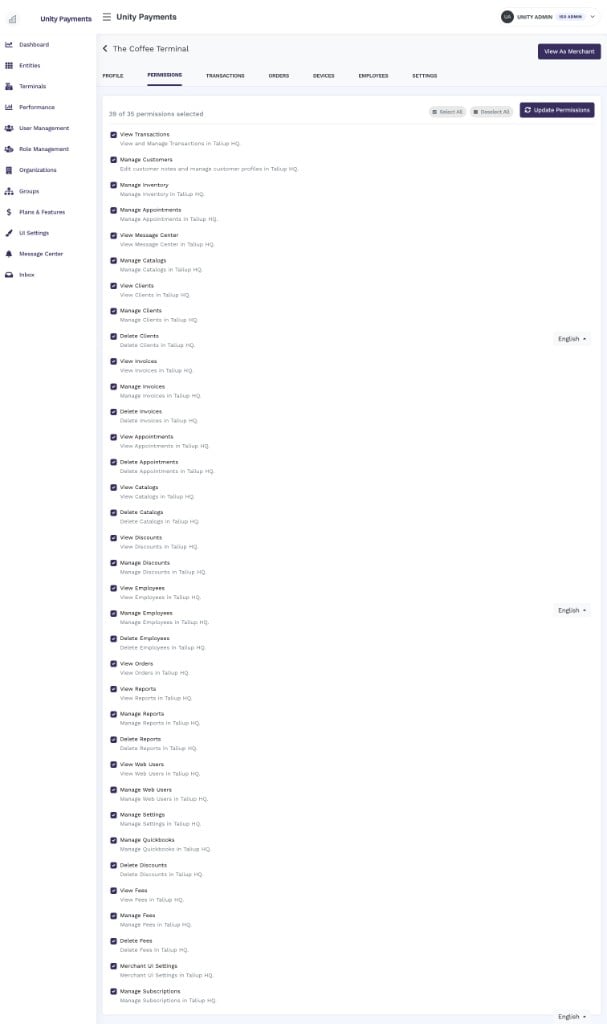 The Manage Entity page has seven tabs: Profile, **Permissions**, Transactions, Orders, Devices, Employees, and Settings. This page documents the Permissions tab only.
***
## How permissions work
Permissions are assigned to the entity's **Admin role** — not to individual users. Every Taliup HQ user holding the Admin role on this entity inherits the current permission set automatically.
An entity can have **multiple admin users**. When permissions are saved, all of them are updated at the same time.
Any Taliup HQ admin user with sufficient access can view and edit this page.
***
## Header bar
The top of the permissions card contains three controls:
| Control | Behaviour |
| ------------------------------- | ------------------------------------------------------------------------------------------ |
| **X of Y permissions selected** | Live counter — updates instantly as you check or uncheck items. |
| **Select All** | Checks every permission in the list. |
| **Deselect All** | Unchecks every permission. For merchant entities, all permissions can be fully deselected. |
| **Update Permissions** | Saves the current selection. Disabled when zero permissions are checked. |
***
## Permissions list
Each row in the list shows:
* A **checkbox** to toggle that permission.
* The **permission name** in bold.
* A **description** in muted text explaining what the permission enables in Taliup HQ.
Changes are not saved until you click **Update Permissions** — you can adjust multiple permissions in one pass before saving.
### Available permissions
The following 35 permissions can be granted to or revoked from an entity's admin users:
| Permission | What it enables |
| ------------------------ | ------------------------------------------------- |
| **View Transactions** | View and manage transactions in Taliup HQ. |
| **Manage Customers** | Edit customer notes and manage customer profiles. |
| **Manage Inventory** | Manage inventory in Taliup HQ. |
| **Manage Appointments** | Manage appointments in Taliup HQ. |
| **View Message Center** | Access the Message Center. |
| **Manage Catalogs** | Manage catalogs in Taliup HQ. |
| **View Clients** | View clients in Taliup HQ. |
| **Manage Clients** | Manage clients in Taliup HQ. |
| **Delete Clients** | Permanently delete client records. |
| **View Invoices** | View invoices in Taliup HQ. |
| **Manage Invoices** | Create and edit invoices. |
| **Delete Invoices** | Permanently delete invoices. |
| **View Appointments** | View appointments in Taliup HQ. |
| **Delete Appointments** | Permanently delete appointments. |
| **View Catalogs** | View catalogs in Taliup HQ. |
| **Delete Catalogs** | Permanently delete catalogs. |
| **View Discounts** | View discounts in Taliup HQ. |
| **Manage Discounts** | Create and edit discounts. |
| **Delete Discounts** | Permanently delete discounts. |
| **View Employees** | View employee records in Taliup HQ. |
| **Manage Employees** | Create and edit employee records. |
| **Delete Employees** | Permanently delete employee records. |
| **View Orders** | View orders in Taliup HQ. |
| **View Reports** | View reports in Taliup HQ. |
| **Manage Reports** | Run and manage reports. |
| **Delete Reports** | Permanently delete reports. |
| **View Web Users** | View web user accounts. |
| **Manage Web Users** | Create and edit web user accounts. |
| **Manage Settings** | Manage entity settings in Taliup HQ. |
| **Manage Quickbooks** | Configure and manage the QuickBooks integration. |
| **View Fees** | View fees in Taliup HQ. |
| **Manage Fees** | Create and edit fees. |
| **Delete Fees** | Permanently delete fees. |
| **Merchant UI Settings** | Access merchant UI customisation settings. |
| **Manage Subscriptions** | View and manage the entity's subscription. |
***
## Saving permissions
Click **Update Permissions** to apply the current selection. On save:
* The Admin role's permissions are synced to **exactly** the checked set — any previously granted permissions that are now unchecked are removed.
* A background job rebuilds the permission cache for **every user** currently holding the Admin role on this entity. Their access is updated immediately without requiring them to log out and back in.
* A success message confirms the update. If a server-side error occurs, an error message is shown and no changes are applied.
Removing a permission takes effect immediately for all admin users on the entity. Confirm with the merchant before revoking access to critical features like View Transactions or Manage Settings.
The Manage Entity page has seven tabs: Profile, **Permissions**, Transactions, Orders, Devices, Employees, and Settings. This page documents the Permissions tab only.
***
## How permissions work
Permissions are assigned to the entity's **Admin role** — not to individual users. Every Taliup HQ user holding the Admin role on this entity inherits the current permission set automatically.
An entity can have **multiple admin users**. When permissions are saved, all of them are updated at the same time.
Any Taliup HQ admin user with sufficient access can view and edit this page.
***
## Header bar
The top of the permissions card contains three controls:
| Control | Behaviour |
| ------------------------------- | ------------------------------------------------------------------------------------------ |
| **X of Y permissions selected** | Live counter — updates instantly as you check or uncheck items. |
| **Select All** | Checks every permission in the list. |
| **Deselect All** | Unchecks every permission. For merchant entities, all permissions can be fully deselected. |
| **Update Permissions** | Saves the current selection. Disabled when zero permissions are checked. |
***
## Permissions list
Each row in the list shows:
* A **checkbox** to toggle that permission.
* The **permission name** in bold.
* A **description** in muted text explaining what the permission enables in Taliup HQ.
Changes are not saved until you click **Update Permissions** — you can adjust multiple permissions in one pass before saving.
### Available permissions
The following 35 permissions can be granted to or revoked from an entity's admin users:
| Permission | What it enables |
| ------------------------ | ------------------------------------------------- |
| **View Transactions** | View and manage transactions in Taliup HQ. |
| **Manage Customers** | Edit customer notes and manage customer profiles. |
| **Manage Inventory** | Manage inventory in Taliup HQ. |
| **Manage Appointments** | Manage appointments in Taliup HQ. |
| **View Message Center** | Access the Message Center. |
| **Manage Catalogs** | Manage catalogs in Taliup HQ. |
| **View Clients** | View clients in Taliup HQ. |
| **Manage Clients** | Manage clients in Taliup HQ. |
| **Delete Clients** | Permanently delete client records. |
| **View Invoices** | View invoices in Taliup HQ. |
| **Manage Invoices** | Create and edit invoices. |
| **Delete Invoices** | Permanently delete invoices. |
| **View Appointments** | View appointments in Taliup HQ. |
| **Delete Appointments** | Permanently delete appointments. |
| **View Catalogs** | View catalogs in Taliup HQ. |
| **Delete Catalogs** | Permanently delete catalogs. |
| **View Discounts** | View discounts in Taliup HQ. |
| **Manage Discounts** | Create and edit discounts. |
| **Delete Discounts** | Permanently delete discounts. |
| **View Employees** | View employee records in Taliup HQ. |
| **Manage Employees** | Create and edit employee records. |
| **Delete Employees** | Permanently delete employee records. |
| **View Orders** | View orders in Taliup HQ. |
| **View Reports** | View reports in Taliup HQ. |
| **Manage Reports** | Run and manage reports. |
| **Delete Reports** | Permanently delete reports. |
| **View Web Users** | View web user accounts. |
| **Manage Web Users** | Create and edit web user accounts. |
| **Manage Settings** | Manage entity settings in Taliup HQ. |
| **Manage Quickbooks** | Configure and manage the QuickBooks integration. |
| **View Fees** | View fees in Taliup HQ. |
| **Manage Fees** | Create and edit fees. |
| **Delete Fees** | Permanently delete fees. |
| **Merchant UI Settings** | Access merchant UI customisation settings. |
| **Manage Subscriptions** | View and manage the entity's subscription. |
***
## Saving permissions
Click **Update Permissions** to apply the current selection. On save:
* The Admin role's permissions are synced to **exactly** the checked set — any previously granted permissions that are now unchecked are removed.
* A background job rebuilds the permission cache for **every user** currently holding the Admin role on this entity. Their access is updated immediately without requiring them to log out and back in.
* A success message confirms the update. If a server-side error occurs, an error message is shown and no changes are applied.
Removing a permission takes effect immediately for all admin users on the entity. Confirm with the merchant before revoking access to critical features like View Transactions or Manage Settings.